


Merlin Bird ID by Cornell Lab
4.930.95K Reviews
App Specs
- Version
- 4.2
- Updated On
- License
- Free
- Downloads
- 10,000,000+
- Developer
- Cornell Lab of Ornithology
- Categories
- Books & Reference
- Platform
- Android, iOS
Screenshots

 Analysis by AppCompare
I often notice birds most clearly when I’m not trying to find them: a call from a tree on my walk, or a flash of movement beyond the kitchen window. That’s the sort of moment when Merlin Bird ID by Cornell Lab is useful. It turns curiosity into a practical identification attempt, without asking me to begin as an experienced birder. I see it as a pocket reference for noticing and learning, rather than a replacement for looking carefully at the bird in front of me.
The Magic of Merlin Bird ID
At its best, Merlin gives a newcomer a straightforward way into bird identification and gives a more experienced observer a handy check in the field. The app is free, rated for Everyone, and made by Cornell Lab of Ornithology. It sits in the books and reference category, but its appeal is more active than a conventional reference book: I can use it while a bird is calling, then return to the information later.
Getting Started
The setup is a breeze. You begin by downloading bird packs for your specific region, which is a neat feature because it means the app won't take up unnecessary space on your phone with birds you won’t encounter. Once that’s done, you’re all set to start identifying your feathered friends.
That regional choice is worth a little thought before a trip. I’d install the pack for the place I expect to visit while I still have a dependable connection, rather than leave setup until I’m already on a trail. A pack that matches the outing keeps the reference focused; if I travel somewhere else, I should expect to prepare for that region too. It’s a small bit of planning, but it makes the app feel more useful as a field companion than as something I open only after I get home.
Identifying Birds
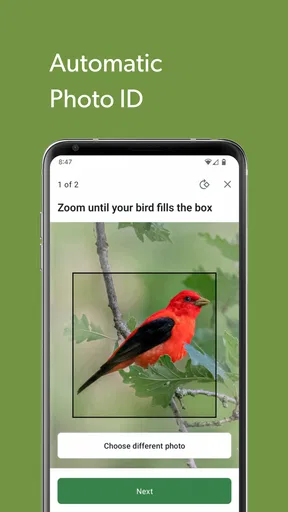
This is where the app truly shines. You can identify birds in two main ways: through photos or sound recordings. If you’ve snapped a picture of a bird, just upload it, and the app will give you a list of possible matches. It’s like having a field guide on steroids!
For a photo, I’d treat the suggestions as a shortlist to investigate, not a verdict. A distant bird, a partly hidden body, or a picture taken in poor light may leave the app with less to work from. I get more value by checking the suggested birds against details I can actually see—shape, visible markings, and the setting—rather than choosing the first result. That habit makes identification more satisfying and helps me learn what separates similar-looking species.
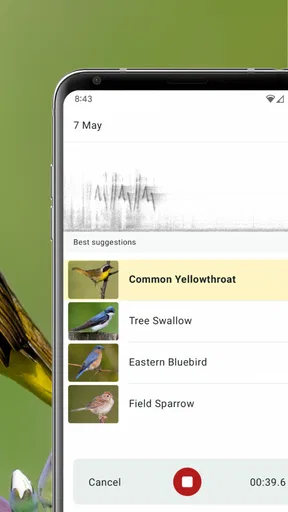
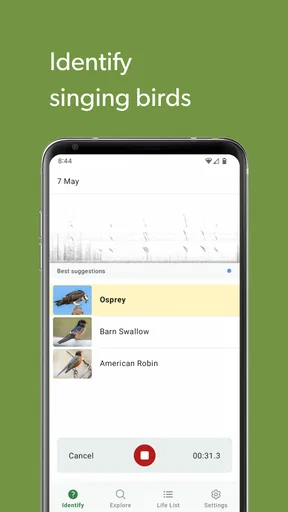
But here’s where it gets cooler – the sound ID feature. Imagine walking through a forest and hearing an unfamiliar bird call. With a quick tap, you can record the sound, and Merlin will help you figure out who’s singing.
Worth Reading Before You Choose

Flipboard Shows What News Apps Must Do Beyond the Feed

Switching to Android Auto Means Rethinking Your Driving Routine

Google Calendar Makes a Crowded Week Easier to Manage

Ludo King Makes the Most of the Minutes Between Plans

Baby Panda World Brings Quick Play to Modern Phones, but Its Game Library Feels Busy

ESPN’s Live Game View Makes Following Close Games Easier
Sound identification works best when I can pause and listen instead of treating every outdoor recording as a clean sample. Wind, traffic, nearby conversation, and several birds calling at once can make a clip harder to interpret. If the first attempt gives an uncertain-looking set of possibilities, I’d try again from a quieter spot or wait for a clearer call. I also find it useful to listen for myself before checking the result: the app can point me toward a name, while my own attention helps me notice the rhythm and tone that make the call recognizable next time.
Bird Packs and Exploration
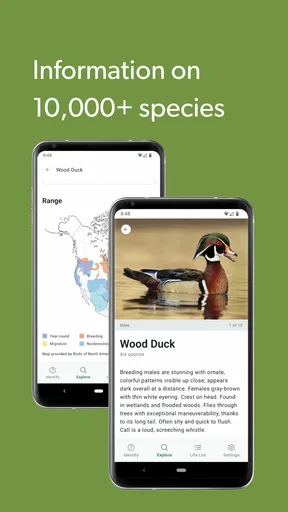
Merlin offers a variety of bird packs based on your location. Whether you're in North America or planning a trip to South America, you can download packs that suit your needs. This feature is perfect for travelers and bird enthusiasts who want to explore different avian species worldwide.
There is a practical trade-off here: downloading a regional pack takes preparation and uses device storage, but it can make the reference more convenient when you are away from a reliable connection. I’d choose packs for places I genuinely plan to visit instead of collecting regions just in case. If I’m heading out for a weekend, I’d also check that the relevant pack is ready before leaving, so I’m not trying to sort out downloads at the trailhead.
The Exploration Feature
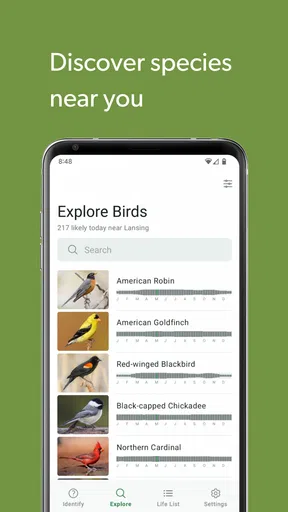
Another cool tool is the "Explore Birds" feature. It allows you to browse through a list of birds in your area or anywhere else. You can learn about what birds are nearby, what they look like, and even listen to their calls. It’s a fantastic way to get to know the local birdlife before heading out into the wild.
This browsing mode is useful even when I’m not trying to identify a particular bird. Before a walk, I can explore likely local birds and listen to their calls so that the sounds outside are less anonymous. Afterward, I can revisit a likely match and compare what I heard with the examples. That before-and-after routine turns a short walk into a small learning session, without needing to keep the phone in my hand the whole time.
Speed, Reliability, and Everyday Use
Merlin’s identification flow is built around quick actions—answering a few questions, using a photo, or recording a sound—so it suits brief moments of curiosity better than searching through a long field guide from scratch. I wouldn’t assume every result will appear instantly in every setting: the experience depends on having the right regional material ready and on the quality of the photo or recording. With those pieces in place, the app is most convenient when I can identify a bird on the spot and then spend more time watching than tapping.
A realistic use case is a morning walk where I hear a repeated call from a hedge but never get a clear view. I can record a short sample, check the suggestions, and then put my phone away to see whether the bird calls again. If the area is noisy, I can wait for a quieter moment rather than keep recording every sound. That restraint matters: repeated attempts do not necessarily improve a poor recording, and watching the surroundings may reveal more than staring at a screen.
For a busy session with several birds calling, I’d use the app as a guide to possibilities, not as a complete account of everything in the soundscape. Overlapping calls can make it difficult to isolate one bird, and a phone microphone is not the same as listening with focused attention in a quiet place. A photo has its own limits when the subject is small, distant, or obscured. These aren’t reasons to avoid the app; they’re reminders to match the method to the moment and to keep uncertainty in the identification process.
How It Compares with a Field Guide
A printed field guide is better when I want to compare pages at my own pace, take notes in the margins, or avoid handling a phone outdoors. Merlin is more convenient when I need a quick starting point from a sound or an image, and its recordings can help connect a name with a call. The two approaches complement each other: if I’m unsure between similar birds, I can use Merlin to narrow the possibilities and then look closely at the traits rather than treating a single suggestion as proof.
Compared with a general web search, the app keeps the task focused on birds and offers a more direct route from observation to candidate identification. A web search can be better when I already know a distinctive detail and want broader background, but searching vague phrases such as “small bird singing in trees” is often less helpful. Merlin is particularly suited to the first question—what might I be hearing or seeing?—while careful observation remains important for the final answer.
Who Will Get the Most from It
I’d recommend Merlin to curious beginners, families who want to make a walk more engaging, and birders who like having identification help close at hand. It is also useful for someone who notices birds in a garden or on a commute but does not want to carry a dedicated guide everywhere. The short routes into identification make it approachable, while browsing birds and calls gives the curious user a reason to keep learning after the immediate question is settled.
It is less suited to someone who wants a purely offline paper reference, dislikes using a phone outside, or expects every sound and photograph to produce a certain answer. It also may not be the right choice for a person who only wants a static list of species and has no interest in identifying calls or images. In those cases, a printed guide or a simpler reference may feel more direct. I would still keep Merlin in mind as a supplement, especially for someone who wants to learn through real encounters rather than only reading descriptions.
Device and Performance Considerations
The app is free and currently at version 3.12, with a minimum operating-system requirement of 7.0. Those details make it easier to judge whether an older device is a plausible fit before relying on it outdoors. As with any app that works with photos, recordings, and downloadable regional material, I’d leave enough room on my phone for the content I plan to use and avoid starting a large setup right before heading out. I can’t sensibly promise identical speed on every device; a phone’s available resources and the conditions of use affect how smooth any field session feels.
For stability, my practical advice is to test the workflow at home: open the relevant pack, try a sample photo or recording, and learn where the identification options are before using them in a brief outdoor encounter. That way, if I’m carrying gloves, standing in wind, or trying not to disturb a bird, I’m not learning the controls at the same time. If an attempt is interrupted or the result is unclear, I can simply return to the observation and try again when conditions are better, rather than assuming the first pass has settled the question.
Why It Stands Out
What makes Merlin Bird ID stand out is its community-driven data. The app is powered by observations from fellow birders around the world, making it incredibly accurate and up-to-date. You’re not just using an app; you’re part of a global birding community!
Moreover, the app is developed by the renowned Cornell Lab of Ornithology, ensuring that the information is credible and scientifically backed. This gives the app an edge over other birding apps, making it a reliable companion on your bird-watching adventures.
Its reputation is reflected in an average rating of 4.9 from around 166,000 ratings, and it has passed 10 million installs. I take that as a sign that it has reached a broad audience, not as a guarantee that every identification will be right in every situation. What matters more to me is using the app in a way that leaves room for checking the clues myself: a useful suggestion should sharpen my attention, not replace it.
Wrap Up
In a nutshell, if you're even remotely interested in birds, Merlin Bird ID by Cornell Lab is a must-have. It's packed with features that make bird identification as easy as pie, and its community-driven data ensures you're getting the best and most accurate information. Whether you're peering through binoculars or just casually observing from your backyard, this app adds a layer of magic to every birding experience.
I’d put it on my phone if I wanted a friendly way to turn everyday bird encounters into questions I can investigate. The strongest reason to use it is the combination of photo, sound, and browsing-based exploration; the main caution is to keep regional preparation and imperfect recordings in mind. If you’re happy to treat the result as a helpful lead and stay attentive to the bird itself, it can make an ordinary walk feel richer without demanding that you become an expert first.
So, next time you hear a tweet, a chirp, or a song, whip out your phone and let Merlin do the talking. Trust me, you’ll be amazed by how much there is to discover!
Pros
- Accurate bird identification using AI.
- Offline functionality for remote areas.
- User-friendly interface.
- Includes bird calls and songs.
- Regular updates with new species.
Cons
- Requires initial data download.
- Limited features without account.
- Large app size may affect storage.
- Some identifications may be incorrect.
- Occasional app crashes reported.
FAQs for Merlin Bird ID by Cornell Lab
What is Merlin Bird ID and how does it work?
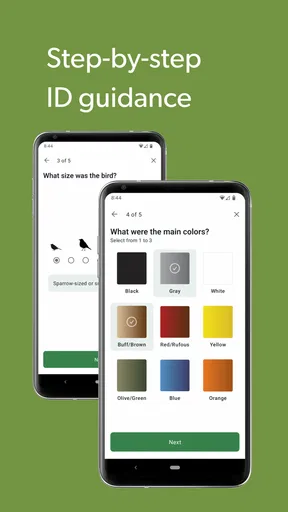
Merlin Bird ID is an app developed by the Cornell Lab of Ornithology designed to help users identify birds. It works by analyzing photos or asking a series of questions about the bird's size, color, and behavior. Additionally, it uses your location to provide a list of likely birds you might encounter.
Is Merlin Bird ID available for both Android and iOS devices?
Yes, Merlin Bird ID is available for download on both Android and iOS platforms. Users can find the app on the Google Play Store for Android devices and the Apple App Store for iOS devices. The app is free to download and use on both platforms.
Does Merlin Bird ID require an internet connection to function?
Merlin Bird ID can function offline, allowing users to access field guides and identify birds without an internet connection. However, downloading new bird packs and using the photo ID feature requires an internet connection. It's advisable to download the necessary data in advance when planning to use it offline.
How accurate is the bird identification feature in Merlin Bird ID?
Merlin Bird ID is highly accurate, utilizing a vast database and artificial intelligence to identify birds. The app's accuracy improves with clear photos and accurate user inputs. While it's very reliable, users should ensure good quality images and correct answers to enhance identification accuracy.
Is Merlin Bird ID suitable for beginner bird watchers?
Absolutely, Merlin Bird ID is designed to be user-friendly and is perfect for both beginners and experienced bird watchers. The guided identification process, rich visual content, and extensive database make it easy for novices to learn about birds and improve their birding skills.


